
Profility Sales
Sales app for rentals and lease-to-own
A rental company's sales process, from lead to signed contract
A sales app on Microsoft Power Apps for companies that rent out equipment and offer lease-to-own. With automatic credit requests, quotes calculated in installments, and an order form the customer signs on a tablet, right there on the spot.
The challenge
Selling rentals and leases means running the numbers, not reading off a price list
No visibility into what's in progress or who's following up
Calculations happen somewhere else and get retyped
Credit approval is an email to finance, not a requirement
Expiring contracts nobody sees coming
A company that rents out trucks, trailers, and vans doesn't sell from a price list. A lease-to-own contract is a schedule: a larger first payment, then a fixed monthly payment over a set term, a buyout amount, a deposit, options, and a mileage cap.
Then there's the credit check. Customers aren't judged on what they rent today, but on what they'll still owe four years from now. A standard sales system doesn't make that distinction.
The result is the same everywhere. Leads come in through six channels and never end up in one place. Numbers are calculated in the ERP and copied over by hand. Contracts are signed on paper, then typed in all over again. And contracts expire without anyone getting a heads-up.
We built a single application that brings the entire process together, on Microsoft Power Apps and Dataverse. Two apps sharing the same data and the same rules: an office app for inside sales, finance, and order processing, and a tablet app for the sales rep at the customer's location.
How it works
Six screens, one continuous flow
1
Everything in progress, at a glance
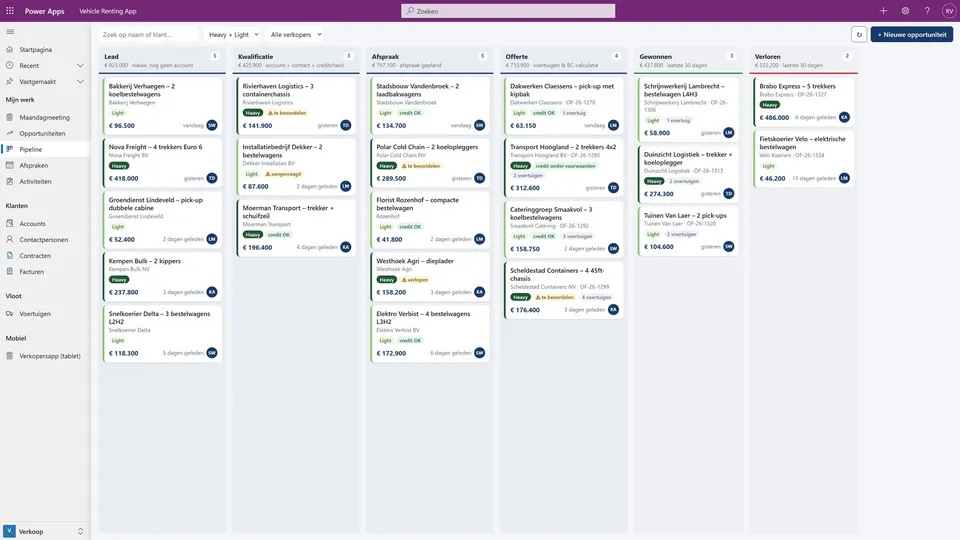
All open deals are laid out in columns by stage, next to the deals won and lost in the last thirty days. Each column shows the number of deals and their total value at the top.
Dragging a card to the next column does more than change a status. All the business rules come along with it: dragging a deal to Qualification creates the customer and the contact person and requests the credit check. If the step isn't allowed, the card snaps back and tells you why.
Heavy or light equipment shown in color, with the credit status and the responsible salesperson right on the card.
2
One deal, not a stack of documents
No lead that you convert into an opportunity, then into a quote, then into an order. One record moves through the stages and keeps track of everything along the way: appointments, calls, emails, tasks, and notes.
A bar next to the form shows which stage the deal is in and what the next step is. A deal can only be marked as lost with a reason, so you can analyze your losses afterward.
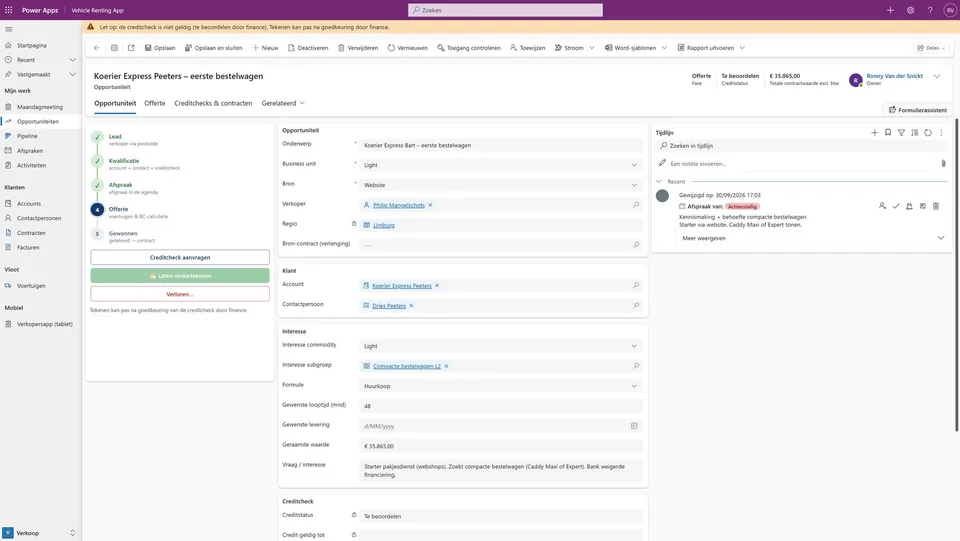
One deal from first contact to signed contract, with the next step always in view.
3
Credit assessment as a process
As soon as a deal is qualified, a credit request goes out automatically. The application is designed to pull in the recommendation from a credit agency such as Graydon, but the decision stays with a person.
Finance approves, approves with conditions, or declines, and records the maximum credit exposure, the expiration date, and any conditions: a higher deposit, or a co-signer.
The assessment isn't advice that gets stuck in someone's inbox. It's enforced at the moment of signing: if the check has expired, the contract value exceeds the approved amount, or the co-signer is missing, the system blocks the signature and gives a clear reason.
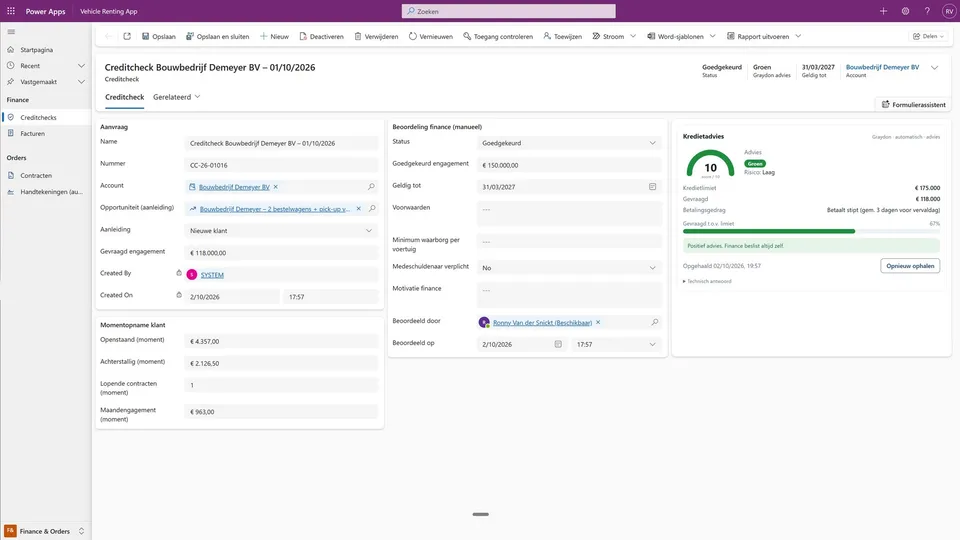
Credit with a full history per customer, visible on every open deal for that customer.
4
A quote built on a payment schedule
For each vehicle, the salesperson chooses the plan, the term, the larger first payment, the buyout amount, and the deposit, and checks off options from a catalog. Each option is set to go either into the first payment or into the monthly price.
The calculation doesn't happen in the application but in the ERP, so there's one single source of truth for pricing. The result comes back as a payment schedule, with the period, the amount, and the subtotal for each period.
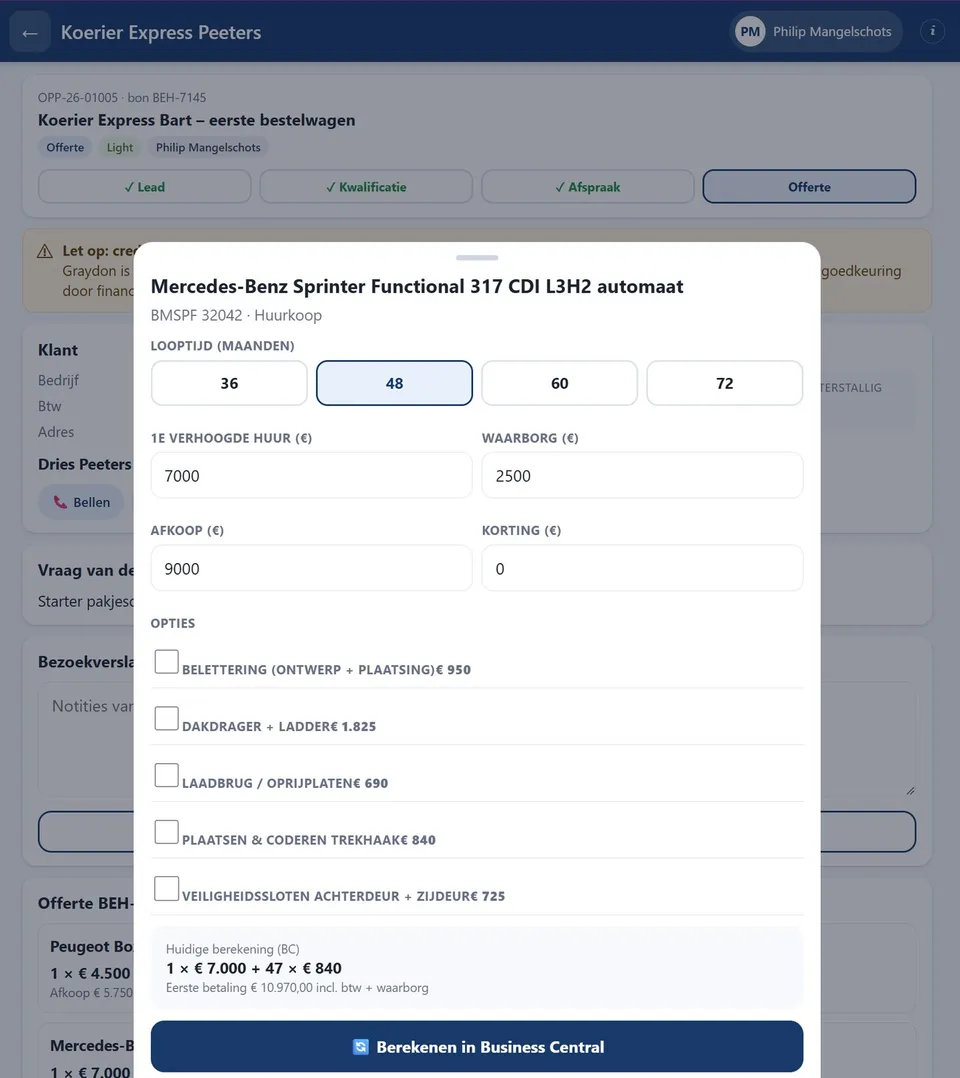
A larger first rental payment, then forty-seven months. Change the term and the schedule recalculates.
5
The salesperson works on a tablet
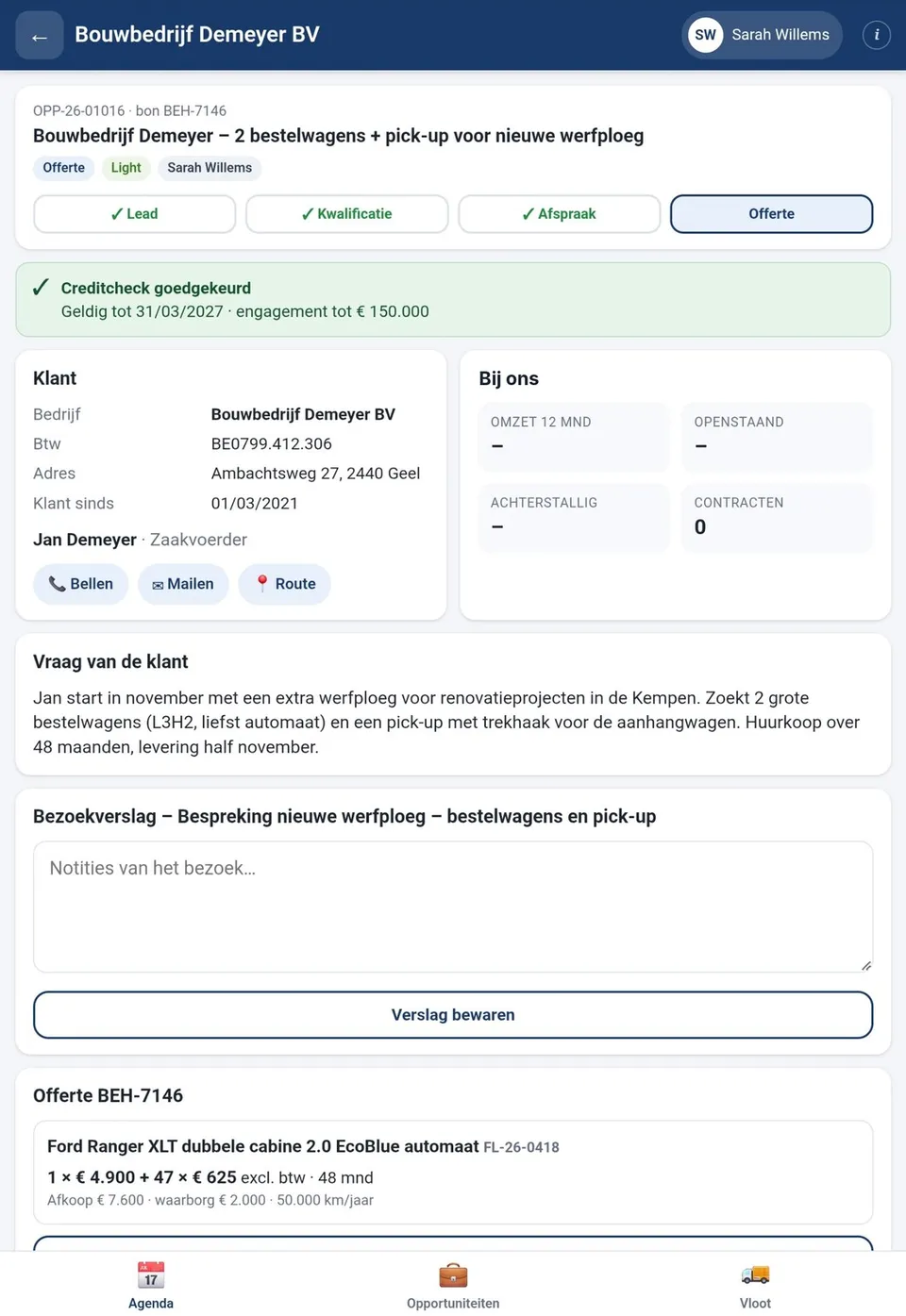
The same data, but on a screen made for one hand and a job site. The day starts with the calendar: for each appointment, the customer, the stage, and a warning if the credit isn't settled yet.
On the customer screen, the key figures, active contracts, the customer's request, and the previous visit report are all in one place. The salesperson calls, emails, or opens directions with one tap, and puts the quote together on the spot.
The salesperson's day, with a warning wherever the credit isn't in order yet.
6
Signing at the customer's, on the same tablet
The customer reads through the order form: both parties, each vehicle with its schedule, the options, and the terms. The signature box only becomes active once they've scrolled to the bottom, and they explicitly confirm two things: that they agree to the order, and that they're authorized to sign on behalf of the company.
After signing, the application immediately generates the PDF, emails it to the customer, creates one contract per vehicle, marks the vehicles as reserved, and sets up a task for the order department. Every signature gets its own audit trail: time, location, device, the exact wording of the agreement, and a digital fingerprint of the document.
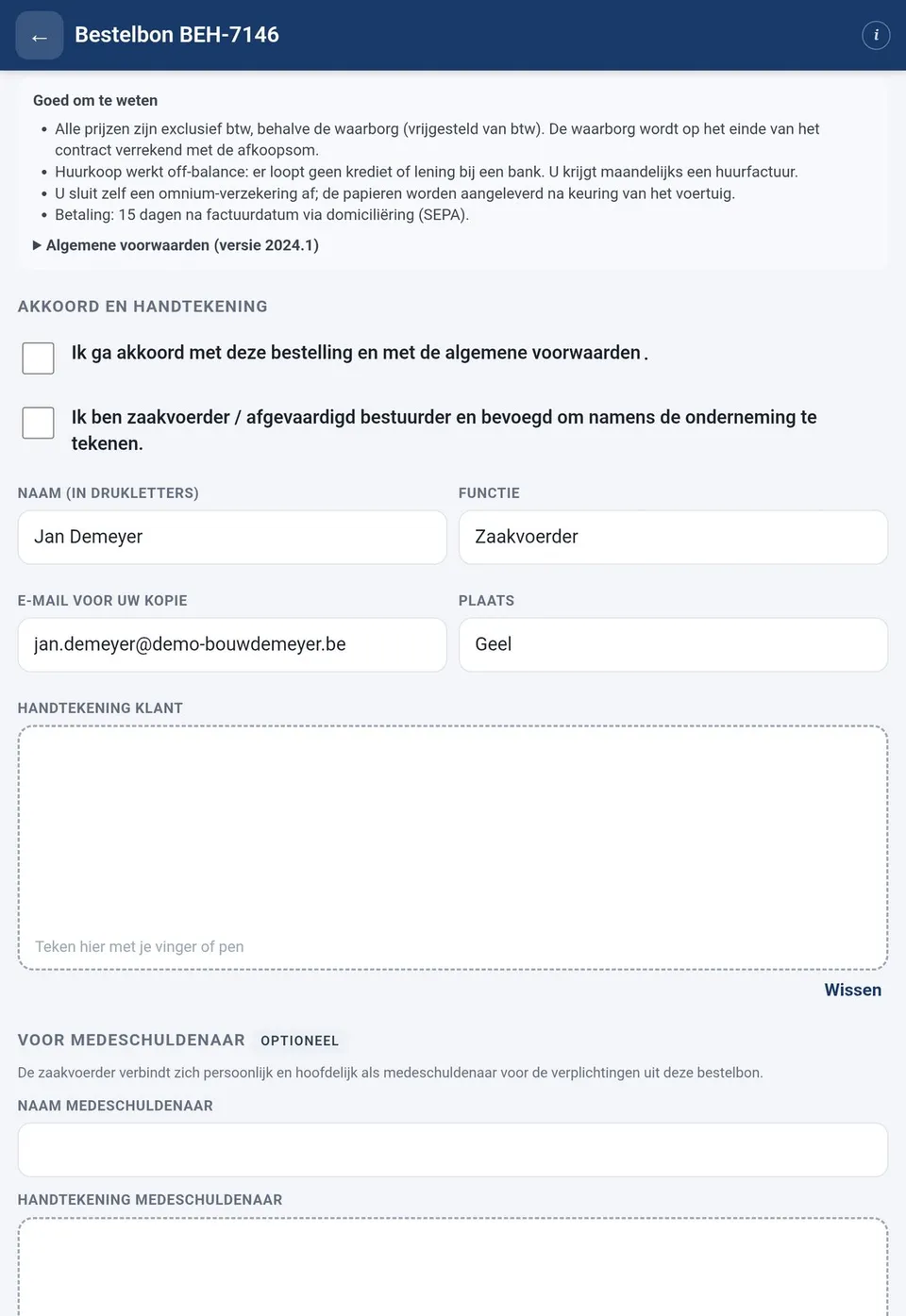
Summary, agreement, signature. The customer signs on the spot and has the order form in their inbox before the salesperson leaves.
What it changes
Three things that change
No more evening paperwork
Quote, order form, and signature all happen at the customer's table. Sales reps no longer spend their evenings retyping, and anything signed shows up in the system as a contract right away.
Credit checks with teeth
Finance's assessment isn't a suggestion, it's a requirement. And it's enforced at the only moment that matters: right before the signature.
Expiring contracts become new opportunities
Six months before a contract ends, it shows up on the list. One click turns it into a new deal, with the same customer and the same sales rep.
Under the hood
Why not an off-the-shelf CRM
A standard sales app assumes a lead becomes a quote and a quote becomes an order, with one price per line item. Lease-to-own doesn't work that way: instead of a price, there's a payment schedule, and the customer isn't judged on what they buy today but on what they'll still owe four years from now.
That's why we built a custom data model on Dataverse, with the business rules enforced on the server so they apply everywhere: in the office app, on the tablet, and in any integration added later. It's easier to maintain, cheaper to license, and it follows the way this company sells instead of the other way around.

Dotted boxes are external sources. The orange dotted line is the hard rule: no valid, approved credit check, no signature.
Who it's for
Not just for the transportation industry
This pattern shows up in any B2B sale where the quote is a calculation, the customer needs a credit check, and the result is a contract that runs for years.
Does this sound like your sales process?
We'd be happy to give you a live demo and look together at what fits your process and what doesn't.
Request a no-obligation demoNo strings attached. We'll show you the application live.

