
CRM AND ERP
A CRM alongside your ERP: why you don't have to keep track of anything twice
You've been working in an ERP like Business Central for years. Adding a CRM sounds like a second system where you keep track of everything twice. It doesn't have to be: agree on which system manages each piece of data, and each system does its own part.

On this page
▾


Already using an ERP and considering a CRM?
Tell us which ERP you use and how your sales process works. We'll show you how each system does its own part.
Tell us about your situationIn short
A CRM and an ERP each do a different part of the work: the CRM keeps track of customers and sales opportunities, and the ERP manages orders, invoices, and payments.
The quote can live in either one. If the pricing calculation is in the ERP, you create it there. If the sales rep writes it up, it can live in the CRM.
You don't keep track of anything twice if you agree up front on one source for each piece of data, and recognize the same customer in both systems by their company registration or VAT number.
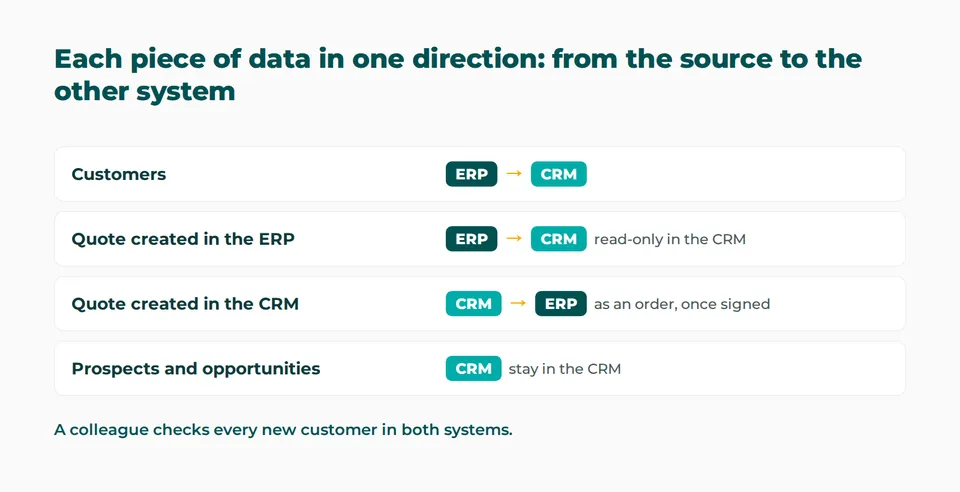
Customers usually ask us to sync each piece of data in one direction, from the system that's its source to the other one: that keeps things simple. An AI agent checks every new customer and only flags what doesn't match to a person.
Five questions give you a solid foundation for the integration. If you're unsure about any of them, run them by us.
Why does a CRM alongside your ERP feel like duplicate work?
Anyone considering a CRM for the first time almost always asks the same question: “Our ERP already has all our customers, orders, and invoices. Why would we use a second system?” You picture two customer lists, the same data typed in twice, and two versions of the truth.
That fear makes sense when two systems run side by side with no ground rules. It goes away when each system gets its own job and the data automatically goes where it belongs. For that, you need clear ground rules, and an integration that follows them exactly.
Which system does which part of the work?
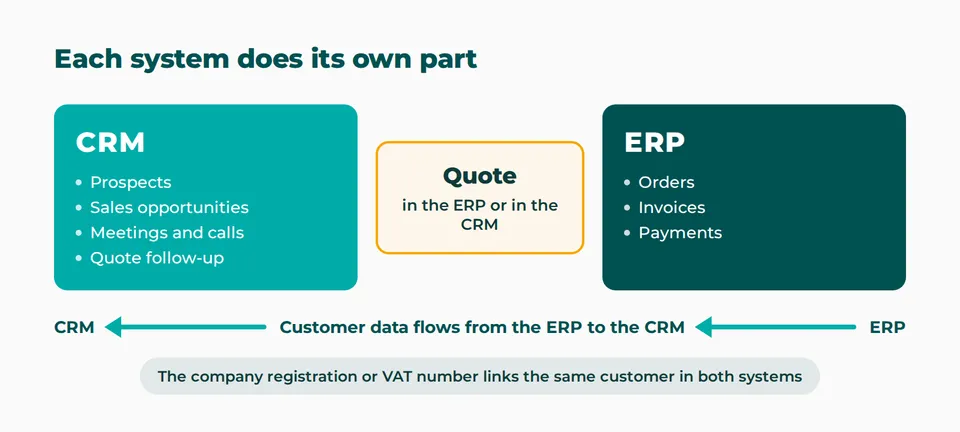
An ERP handles the financial side: orders, invoices, payments, and everything that goes with them. A CRM keeps track of what comes before that and what runs alongside it: prospects, sales opportunities, meetings, calls, and quote follow-up.
So you're not doing the same work in two systems. In each system, you work on the part it was built for. There's one question you do need to answer up front: where do you create the quote?
Still figuring out which type of CRM is right for you? Choosing a CRM for your SME will help you get started.
Do you create the quote in the CRM or in the ERP?
Both approaches are common, and both work. It mostly depends on where your pricing calculation lives.
| Approach | Where do you create the quote? | When does this fit? |
|---|---|---|
| Quote in the ERP | In the ERP, after which it shows up read-only in the CRM | The price comes from a calculation, configuration, or estimate that lives in the ERP, as is common at many construction and installation companies |
| Quote in the CRM | In the CRM, after which it goes to the ERP with the order | The sales rep writes up the quote, and the ERP only comes into play once there's an order |
Quote in the ERP. The sales rep keeps creating quotes in the software they already know. The quote shows up in the CRM automatically, where it's read-only. That's where the rep follows up on it: they call, schedule a meeting, and keep the status up to date. Any change to the quote is always made in the ERP and then flows through. That way, nobody has to rebuild a calculation that already exists in the ERP. To learn how to follow up on those quotes, read quote follow-up.
Quote in the CRM. The sales rep writes up the quote in the CRM, which turns it into a document. If something needs to change, the rep edits the document, and then the customer signs it digitally. The moment it's signed, the quote goes to the ERP as an order. Invoicing and accounting happen there. The order stays in the CRM for reporting, but nobody works on it there anymore.
Both approaches can even exist side by side within one group of companies, when one company starts from an inquiry and a calculation and another from its own prospecting. What matters is that you choose one approach per company or per type of sale, and put it in writing.
Customers do exist in both systems. Usually the ERP is the source system for them: a change you make there is automatically copied to the CRM, so the two don't drift apart.
| Data | Source | Direction |
|---|---|---|
| Prospects, sales opportunities, and activities | CRM | stay in the CRM |
| Quotes | ERP or CRM, depending on the approach | from the ERP to the CRM, or as an order from the CRM to the ERP |
| Customers | ERP, usually | changes flow automatically from the ERP to the CRM |
| Orders, payments, and other financial data | ERP | managed in the ERP; if the quote started in the CRM, the order stays visible there for reporting |
How does a prospect become a customer without duplicate work?
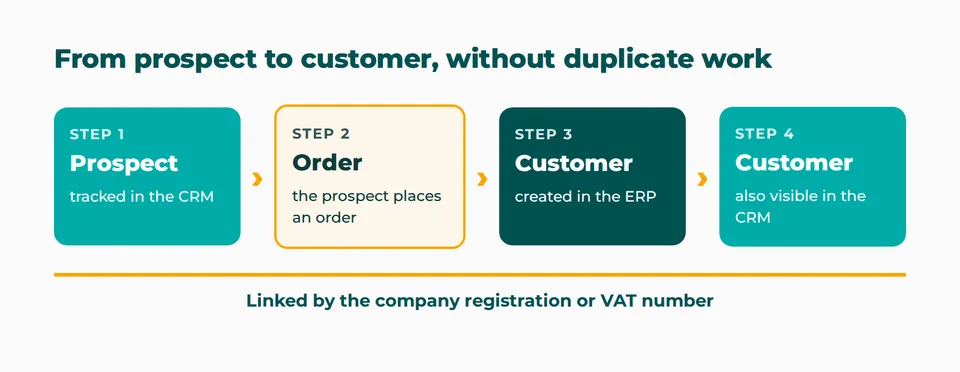
A prospect and a customer aren't the same thing. You track a prospect in the CRM as long as there's no order. Only when the company becomes a customer does it belong in the ERP, because that's where orders, invoices, and payments end up.
That's why you create the customer in the ERP and link them to the prospect in the CRM with a unique number, such as their company registration number or VAT number. That number is the key that tells both systems they're dealing with the same customer. Also agree on how you'll recognize a customer who doesn't have that number. The result is one continuous history: from prospect in the CRM, to customer in the ERP, to customer in the CRM. You can see who made first contact and what was proposed, and you know which customer came out of it.
There's another way, too. Some companies convert the prospect to a customer in the CRM. A scheduled process then checks whether that customer already exists in the ERP and creates them if they don't, with the same account owner as in the CRM. Which route fits depends on how the company works. Either way, the customer is created in one place, and both systems know through the unique number that it's the same customer.
How do you agree on which system is the source of what?
We worked for a group that had acquired several companies and needed to get all their systems working together. Each company had its own needs and requirements. We held workshops with all parties, usually separately, so everyone could speak freely about what they needed. Based on that, we wrote down for each area which system was the source, and then we checked that all the integrations worked properly. In that project, the ground rules took more discussion than the technology.
For an SME with one ERP and one CRM, that's a smaller exercise, but the question is the same: in which system do you change this piece of data, and who's allowed to do it? Write it down in a table like the one above and have the people who work with it review it. To see which data you should capture along the way, read our article on a customer management system.
What if something still goes wrong?
A good integration prevents a lot of mistakes, but not all of them. We regularly run into three: a customer who exists twice, a customer without a VAT number, and a customer listed under two spellings.
Here's one way a duplicate customer happens. The sync fails because of a technical glitch, so the new customer doesn't show up in the ERP. A colleague then creates them in the ERP by hand. If the unique number is missing or mistyped, the sync can't find that customer later and creates another one on its own.
That's why you need a check, and it's best to have an AI agent do it first. As soon as a new customer is created, the agent compares them in both systems and looks for a duplicate customer, a missing VAT number, or a different spelling. Only what doesn't match goes to the person responsible, who puts it right.
Does a CRM alongside your ERP need to sync in both directions?
It can, but it doesn't have to. You look at syncing one piece of data at a time: customer data can flow from the ERP to the CRM, while an order goes the other way. We find that customers usually ask us to sync each piece of data in one direction, from the system that's its source to the other one: that keeps things simple. If the ERP is the source for customers, you create the new customer there yourself and link them to the prospect in the CRM.
That simplicity has its advantages: the data stays visible, mistakes are spotted sooner, and everything stays in people's hands, instead of in a process nobody keeps an eye on anymore. If data does need to flow both ways, that's possible too: with AI, that kind of integration keeps getting easier. The more you automate, the more important it is to agree on who does the checking.
What should you agree on before you connect your CRM and ERP?
Answer these five questions, ideally together with the people who work with both systems every day:
Where do you create the quote: in the ERP or in the CRM, and why?
Which system is the source for customer data?
Who creates a new customer, and in which system?
Which unique number identifies the same customer in both systems?
Who does the checking, and how does that person notice something went wrong?
With those answers, you have a solid foundation for the integration: something everyone has agreed on, instead of a risk. Unsure about any of the five, or want to know what that looks like with your ERP? Tell us about your situation. We'll look together at which data needs to flow and what checks are needed, and build the integration that fits the way you sell.
Already using an ERP and considering a CRM?
Tell us which ERP you use and how your sales process works. We'll show you how each system does its own part.
Tell us about your situationKeep reading

AI IN PRACTICE
Beyond digitization: working with an AI assistant on top of your business Applications
A customer email comes in. Five minutes later, the project is set up in Connect, our in-house application, and colleagues can log hours on it. Add the tasks in Jira and it takes fifteen minutes. Meanwhile, I was drinking my coffee. That's how we've been working at Profility for a year now. This is the step after digitization.

AI IN PRACTICE
Every application you commission today needs an MCP
If you're having an application built today, whether fully custom or on the Power Platform, there's one question many clients still don't ask: does it have an MCP? Without one, an AI agent can't work for you inside that application. If you want to build for the future, it's non-negotiable.
POWER APPS IN 2026
Are canvas apps dead? AI changes the trade-off
For years, writing less code was the case for canvas apps. But what if AI writes that code? Are canvas apps dead? No. But choosing canvas by default is.